Corrections for item type
Your item may be set up as item type 'other', but please know that is best used for non-regulated items like power cords, adapters, user manuals or other pieces you would like to declare but are not required for you to do so.
Potentially regulated items that are powered, batteries, or formulated products should be set up using one of those item types. We sent your item back because we believe you incorrectly set up an item type. Your corrections message will tell you exactly which component to edit.
Steps to update the Item Type:
Open and log-into the Product Intelligence Platform (PIP): portal.smartersorting.com
On the left, select 'Pending Requests' and the UPC will be listed here with an orange ‘corrections needed’ status. Click and open the UPC.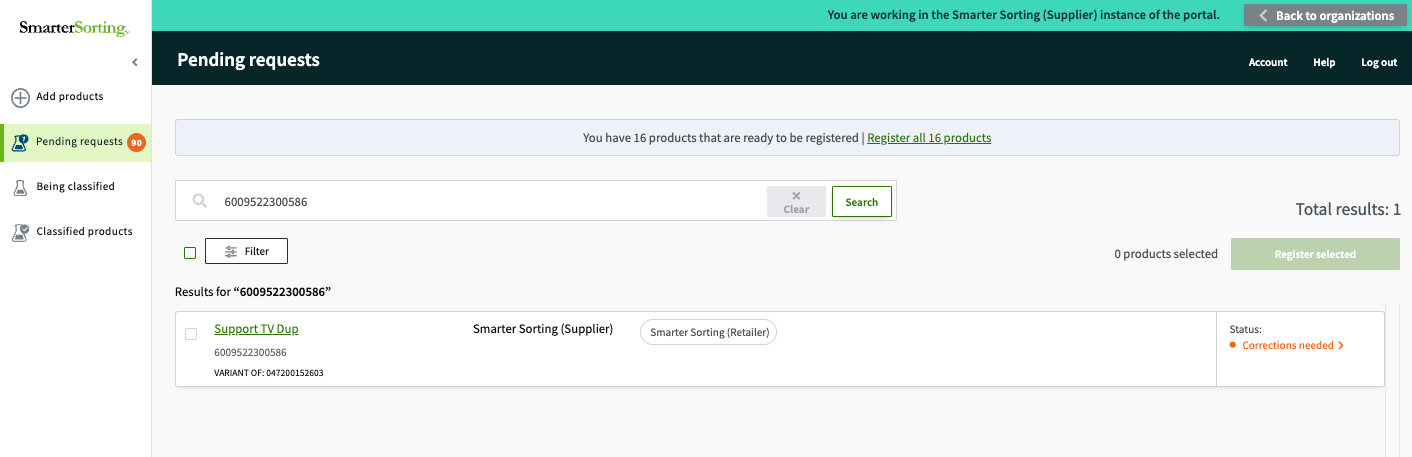
Once the item has opened, scroll down to the components section and change the ‘Component Type’ in the dropdown as shown below:
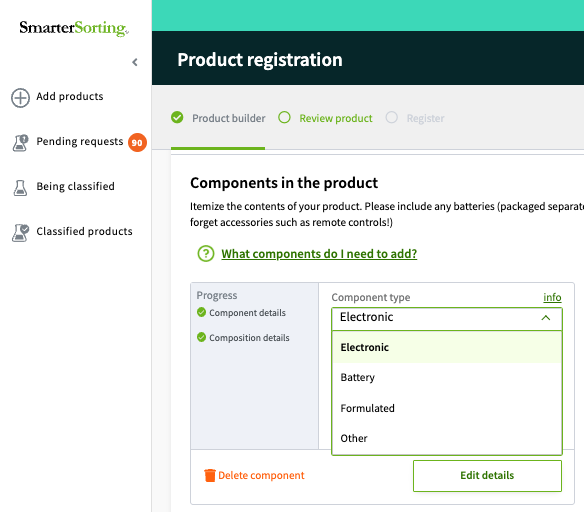
Once you have made all edits, resubmit the item for classification.
Thank you for providing us the information needed to properly classify your product!
If you have any questions please reach out to Support at support@smartersorting.com or use the chat box on the bottom left of this page.
Still stuck? Contact support or email support@smartersorting.com Either way it lands straight in our ticket queue.