How to initiate dropship
If you are working with Costco for dropshipping, you can request a dropship review via the Product Intelligence Platform (PIP).
To do so, the item has to first complete classification and be shared with Costco as a retalier. Once done, find the item in the "Classified Products" section of your PIP account.
Search for the UPC of the product and then in the top left corner you will see a white button for 'Dropship review'. Select this to open up the dropship page and then fill in dropship details. Once done, submit the dropship.
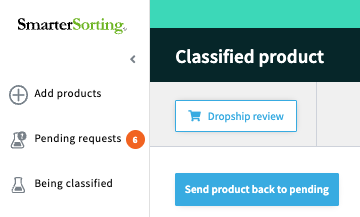
Be careful not to click the blue 'Send product back to pending' button. This will send your item back for edits and start the classification process from the beginning. Only click the blue button if you need to make edits on the UPC details.
If you have already initiated a dropship review and need to make edits on the dropship information, please email support@smartersorting.com and we can move the dropship piece back for edits.
If you need to make edits on the entire item, please click the blue 'Send product back to pending' button, change the information and resubmit for classification. After classifying (typically 3 business days), select your item in 'Classified Products' and re-submit the product for dropship review.
If you have any questions or run into issues please email Support@smartersorting.com.
Still stuck? Contact support or email support@smartersorting.com Either way it lands straight in our ticket queue.