Troubleshooting Product Intelligence Platform Common Issues
Issue
I am trying to login, I know I set up an account, but an error is showing saying email is invalid or doesn't exist.
The option to continue registration after filling in my details and accepting terms is showing as greyed out.
Or you received the message "Something went Wrong" when trying to log in to the portal.
Resolution
Sometimes this can be a browser issue. Please make sure that you are using chrome as your web browser in order to ensure the best user experience.
If that does not correct the behavior, it is likely due to your company blocking access by their firewall. An easy way to test this is to login to the Smarter Sorting Product Intelligence Platform on your person device, on either cell service or your own wifi (not company owned). Using a cell phone and the cell service might be the easiest way. To correct this you will need to work with your IT department to whitelist:
Related Issues
- I know I have an account, but when I try to log-in an error pops up and says the email is invalid or does not exist
- I enter my credentials and try to log-in but the page just refreshes back to the log-in page.
- After completing details and accepting terms, the option to complete registration is grayed out
- I received the message "Something Went Wrong" when trying to log-in to the Product Intelligence Platform
- While trying to sign-up for the first time, it redirects back to the home page
Troubleshooting Steps
In most cases, the issue is with the internet browser.
First, make sure that you are using Google Chrome as your web browser in order to ensure the best user experience.
If using Google Chrome and the issue still persists, it could be an extension or add-on loaded in the browser. Incognito mode can be used to troubleshoot this further. To enter Incognito mode, please select the three dots in your browser’s upper right corner. In the dropdown, select ‘New Incognito Window’
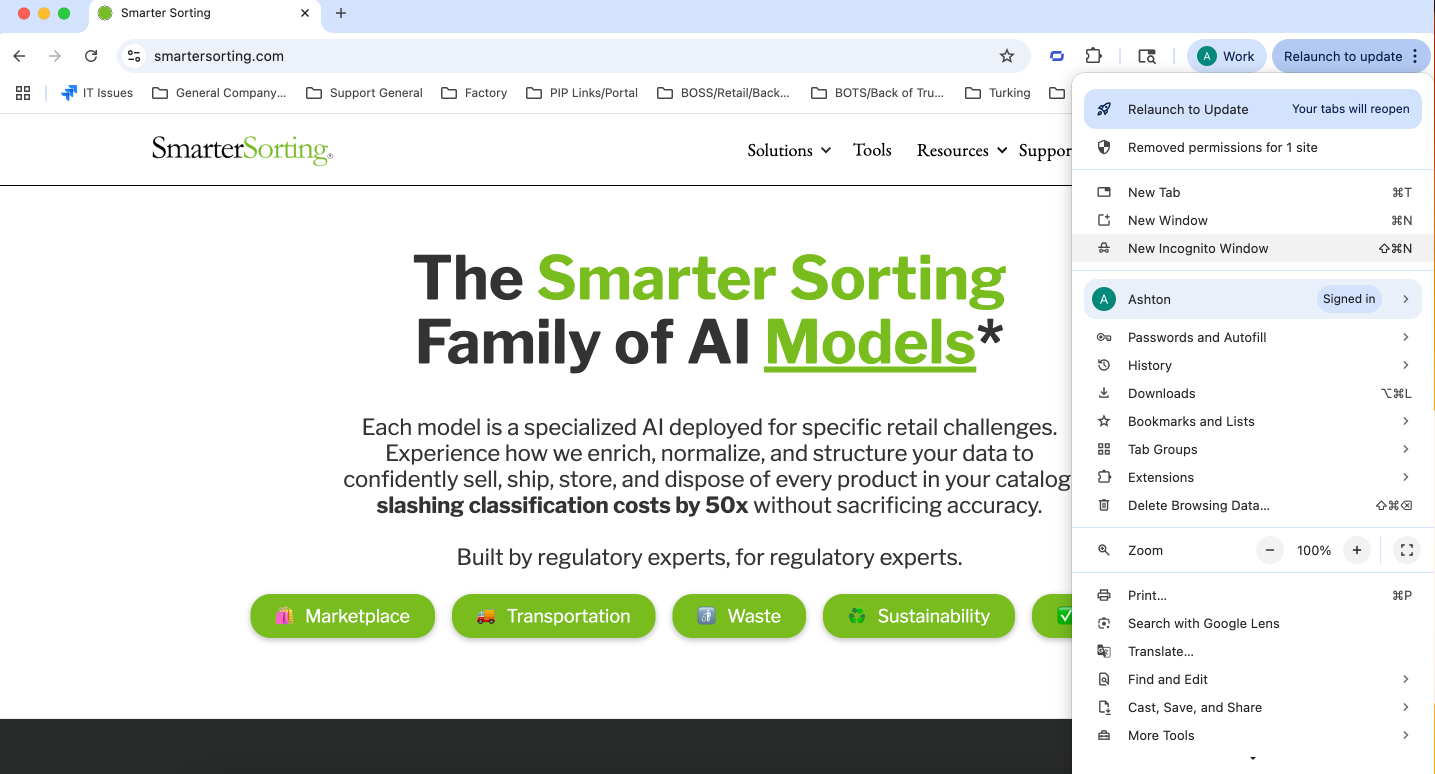
Once the Incognito window has opened, attempt to login like normal.
If that does not correct the behavior, it is likely due to your company blocking access with their firewall.
An easy way to test this is to login to the Product Intelligence Platform on your personal device, on either cell service or your own wifi (not company owned). Using a cell phone and cell service might be the most accurate way.
If the firewall is determined to be the issue, please work with your IT department to whitelist the following sites:
- http://smarterSorting.com/
- http://sorting.tech/
- compliance-api.production.sorting.tech
Sign Up is Redirecting to the Main PIP Page
We believe this is related to the user’s cache. This method allows you to clear Google Chrome’s Cache Data for a specific URL.
Press SHIFT+CTRL+I to open the Google Chrome Developer Tools panel. Go to Network Tab and select the Disable Cache checkbox. Type the URL you want to clear from the browser cache in the address bar and press Enter. Click and hold the reload button until a modal window pops up, then select the Empty Cache and Hard Reload hidden option. As soon as the page has been fully reloaded, you can unselect the Disable cache checkbox and disable that feature.
Still stuck? Contact support or email support@smartersorting.com Either way it lands straight in our ticket queue.