Back of Truck System (BOTS/TruckSiS) Mobile app not showing active trip or preventing access to current stop.
The TruckSIS mobile site is not showing the active trip or prevents access to the current stop, notifying that one of the previous stops is still active.
Make sure you have the correct mobile app installed on the phone.
The correct icon should look like 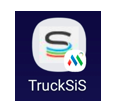
If this icon 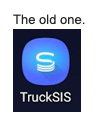 is present contact Republic to have the correct app sent
To troubleshoot this issue further:
- Open up the Google Chrome app.
- Once you have that open look in the upper right hand corner and click the 3 vertical dots.
- Select New Incognito Tab
- Login to the website as normal when the new tab opens.
If the site performs as expected the cache data on the mobile phone should be cleared. Click http://www.samsung.com/us/support/answer/ANS00077611/ for directions on clearing cache. Be aware this may delete saved website data like usernames and passwords which will need to be input again.
Still stuck? Contact support or email support@smartersorting.com Either way it lands straight in our ticket queue.